When designing mechanical components, one of the biggest questions engineers face is: Will this part survive under real-world loading conditions?
That is where SOLIDWORKS Simulation comes into play. It allows engineers to predict how a design behaves before manufacturing, reducing costly design errors and improving product reliability.
Two of the most commonly used simulation types are:
- Static Analysis
- Dynamic Analysis
Although both evaluate stress and deformation, they solve entirely different engineering problems. Understanding the difference helps you choose the right analysis and obtain accurate results.
What is Static Analysis?
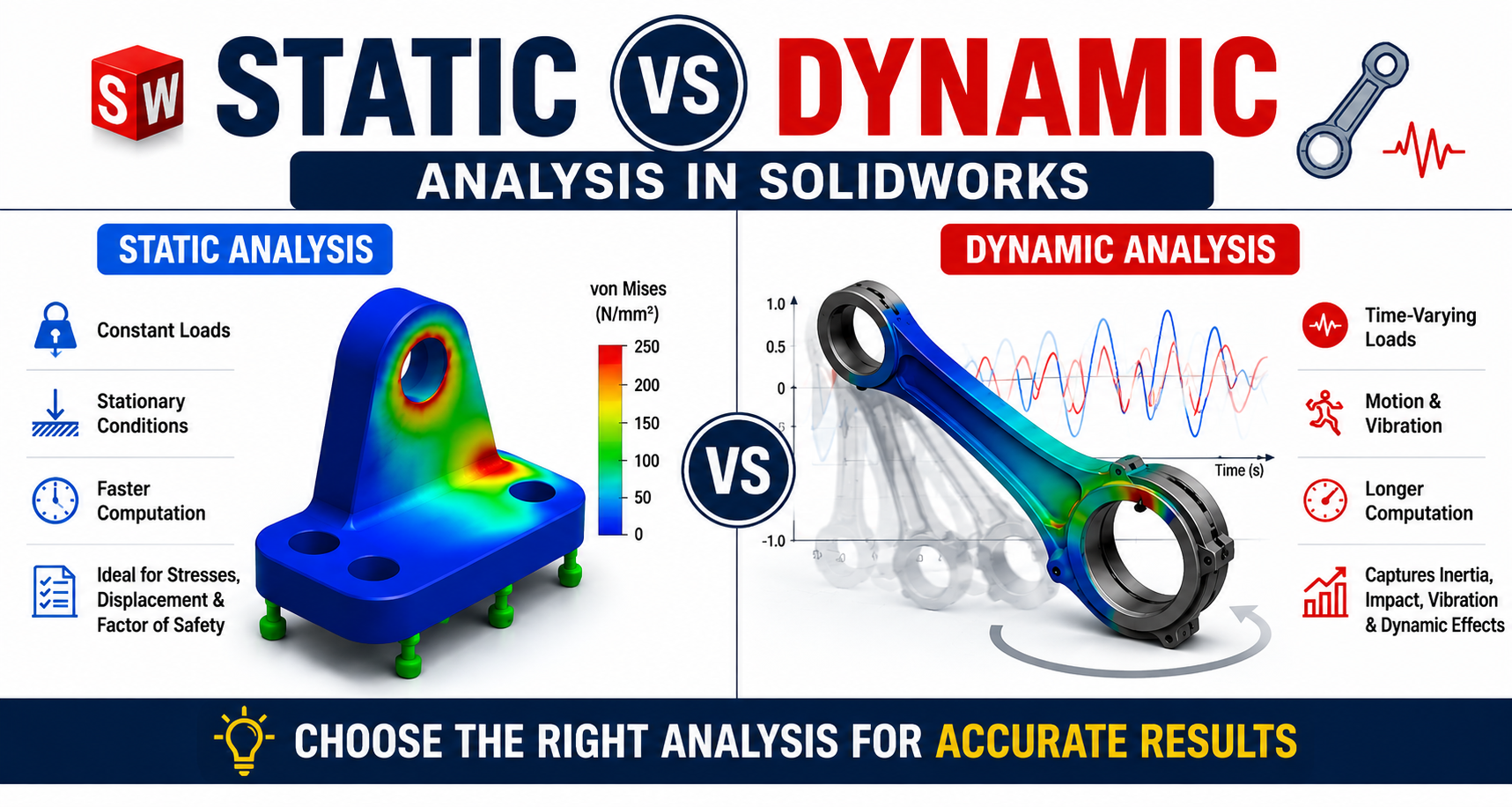
Static Analysis evaluates a component under constant or slowly applied loads. The software assumes the load does not change with time, meaning inertia and acceleration effects are ignored.
Typical outputs include:
- Stress distribution
- Displacement
- Strain
- Factor of Safety
- Reaction forces
Common Applications:
- Machine frames
- Brackets
- Base plates
- Pressure vessel supports
- Structural components
- Fixtures
- Mounting plates
If the load is applied gradually and remains nearly constant, static analysis is usually sufficient.
Example of Static Analysis
Imagine a steel bracket supporting a 500 N motor. Since the weight remains constant and does not move, you only need to determine:
- Will the bracket fail?
- How much will it deflect?
- Is the stress below the material's yield strength?
This is a classic static analysis problem.
What is Dynamic Analysis?
Dynamic Analysis evaluates components subjected to time-varying loads. Unlike static analysis, it considers:
- Acceleration
- Velocity
- Inertia
- Impact
- Vibrations
- Oscillating loads
Dynamic simulation predicts how a design behaves while moving or experiencing changing forces.
Common Dynamic Analysis Applications:
- Gear mechanisms
- Engine components
- Crankshafts
- Cam followers
- Suspension systems
- Robotic arms
- Conveyor systems
- Rotating shafts
- Impact-loaded components
Example of Dynamic Analysis
Consider a connecting rod inside an engine. The piston continuously accelerates, decelerates, and changes direction thousands of times every minute. The forces are constantly changing.
A static analysis cannot accurately capture these effects. Instead, engineers use dynamic analysis to evaluate the varying stresses throughout the engine cycle.
Static vs Dynamic Analysis Comparison
| Feature | Static Analysis | Dynamic Analysis |
|---|---|---|
| Load Type | Constant | Time-dependent |
| Motion Considered | No | Yes |
| Acceleration | Ignored | Included |
| Inertia Effects | Ignored | Included |
| Vibration | No | Yes |
| Impact Loading | No | Yes |
| Computational Time | Fast | Longer |
| Complexity | Easy | Advanced |
| Typical Applications | Brackets, Frames, Supports | Engines, Robots, Gears, Machinery |
How SOLIDWORKS Solves Static Analysis
During a static study, SOLIDWORKS:
- Creates a finite element mesh.
- Applies material properties.
- Adds fixtures and constraints.
- Applies external loads.
- Solves for equilibrium.
- Calculates stresses and displacements.
The solver assumes the structure has reached a stable equilibrium.
How SOLIDWORKS Solves Dynamic Analysis
Dynamic analysis involves additional physics parameters including mass, damping, time steps, inertia, velocity, and acceleration. Instead of solving one load case, the software solves the model at many time increments to track its changing behavior.
Types of Dynamic Analysis in SOLIDWORKS
SOLIDWORKS supports several dynamic simulation methods:
1. Time History Analysis
Calculates the response over time. Ideal for impact loading, machine startup, and sudden force application.
2. Harmonic Analysis
Used for sinusoidal or cyclic loading. Common applications include electric motors, pumps, rotating machinery, and fans.
3. Frequency Analysis
Determines the natural frequencies of a structure to help engineers avoid resonance. Applications include machine frames, bridges, aerospace structures, and robotics.
4. Random Vibration Analysis
Simulates unpredictable vibrations such as road conditions, earthquakes, aircraft vibration, and industrial equipment operational noise.
5. Motion Analysis
Combines rigid body motion with forces and can transfer loads into structural simulation. Useful for mechanisms, linkages, cam systems, and gear trains.
When Should You Use Static Analysis?
Choose static analysis when:
- Loads are constant.
- Motion is negligible.
- Acceleration is insignificant.
- The structure is stationary.
- You need quick design validation.
When Should You Use Dynamic Analysis?
Use dynamic analysis when:
- Parts are moving.
- Loads vary over time.
- Components vibrate.
- There are impacts or shocks.
- Rotating machinery is involved.
Advantages Comparison
Advantages of Static Analysis
- Easy to set up
- Faster solution time
- Lower computational cost
- Ideal for early-stage design
- Excellent for structural validation
Advantages of Dynamic Analysis
- More realistic results
- Captures transient behavior
- Predicts vibration issues
- Detects resonance
- Evaluates impact loading
- Improves product reliability
Common Beginner Mistakes
- Using Static Analysis for Moving Parts: A rotating shaft experiences changing stresses. Using static analysis may underestimate fatigue and peak stresses.
- Ignoring Inertia: Heavy moving parts generate inertial forces that static analysis cannot capture.
- Skipping Frequency Analysis: Every structure has a natural frequency. Ignoring resonance can lead to catastrophic failures.
- Incorrect Boundary Conditions: Improper fixtures or unrealistic constraints often produce inaccurate simulation results.
Real-World Example: Robotic Arm
- Static Analysis: Checks whether the arm can safely hold a payload at a fixed position.
- Dynamic Analysis: Evaluates the arm while accelerating, stopping, changing direction, and lifting objects. Only dynamic analysis captures the additional stresses caused by motion.
Best Practices
- Use Static Analysis for stationary structures under constant loads.
- Use Dynamic Analysis when motion, vibration, impact, or changing loads are significant.
- Start with a static study during early design, then move to dynamic analysis if operating conditions require it.
- Always validate material properties, fixtures, contacts, and mesh quality before interpreting results.
Conclusion
Static and dynamic analyses are both essential tools in SOLIDWORKS Simulation, but they serve different purposes. Static analysis is ideal for evaluating structures under constant loads, while dynamic analysis is necessary for systems where forces change over time due to motion, vibration, or impact. Selecting the appropriate analysis method leads to more accurate predictions, better product performance, and fewer costly design iterations.
Continue Learning SOLIDWORKS Simulation
Master SOLIDWORKS Modeling, Assemblies, Drawings, Sheet Metal, Motion Studies, and Simulation with practical, project-based training.
Access SOLIDWORKS Mastery Pack (12 Courses in 1) - 854-360x220.png)